

If you want to make your first purchase on Ebay, then read the article. Here you will find information on how to register on the portal, how to place an order.
The content of the article
- Registration for ebay: step -by -step instructions
- How to fill out the delivery address on ebay?
- How to download the product catalog on ebay?
- How to find goods in the Ebay online store?
- How to add the goods to the basket on ebay and remove from the basket?
- Video: How to place an order in the Ebay online store: Instruction
Many buyers use the service ebay. This trading platform offers customers a wide variety of goods. Here you can find clothes, electronics, accessories and many other products.
However, earlier this portal was available only in English, French, German and other languages, but there was no Russian -speaking service. Which limited the possibility of some users. And it was precisely because of this that they did not make purchases here. Now this problem is solved.
Registration on ebay: step-by-step instruction
If you are in any city in Russia, then crossing the link of the store ebay, you will automatically get to the Russian -speaking site. Unfortunately, users of other countries will not see the Russian -speaking portal, for them it will open in English (in the classical version).

How to fill out fields for registration on ebay
For registration on ebay Do the following:
- Go to the online store and at the top you will see the tab in the left corner of the page- Registration.
- Go to the registration page.
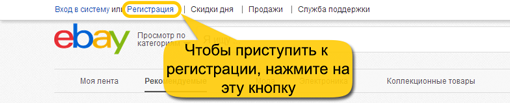
Where is the key - registration on ebay?
- Fill in all the fields (name, surname, email address, password) in English. To do this, you can use the translator on specialized site.
- Next, read the terms of the user agreement and confirm what you got acquainted.
- And send your data for processing.
- Go to your email, find a letter from this portal, confirm your registration.
How to fill out the delivery address on ebay?
After you go to ebay In the left corner of the page you will find your account. To make purchases, you need to fill out the address. For this:
- Click the arrow near your name, and you will open the tabs, follow the tab Account settings.
- There will still open subcategories, you will go to Addressesand click on the key - Create.
- The field that is better to fill in in English. In the first tab choose the country: Russian Federal.
- Write the name below your city And region.
- Next, indicate yours index.
- Then write name streets And house number, apartments.
- Indicate at the end No. your phone.
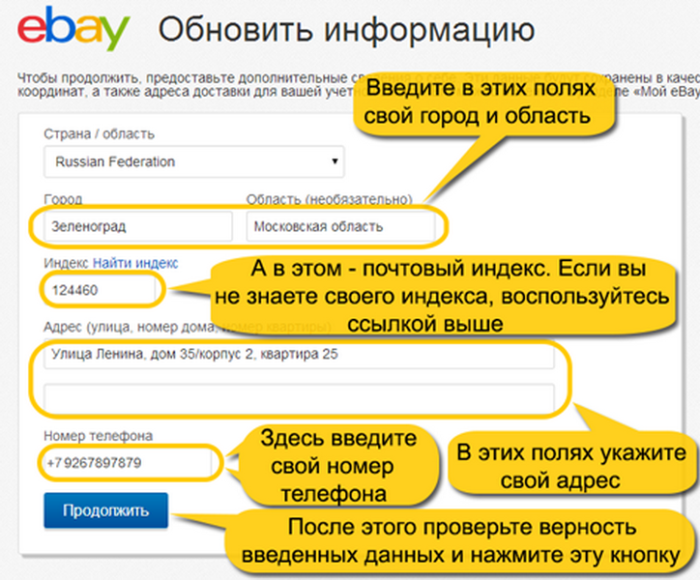
Filling the address on ebay
How to download the product catalog on ebay?
If you want to buy a certain product in the store ebay, then you can find it in catalog of goods. To do this, move your gaze to the upper panel of the resource, there you will see categories:
- fashion
- electronics
- collectible goods
- house and garden
- sporting goods
- auto, Moto
In each category there is subcategories for a specific product, there you will find the necessary product.
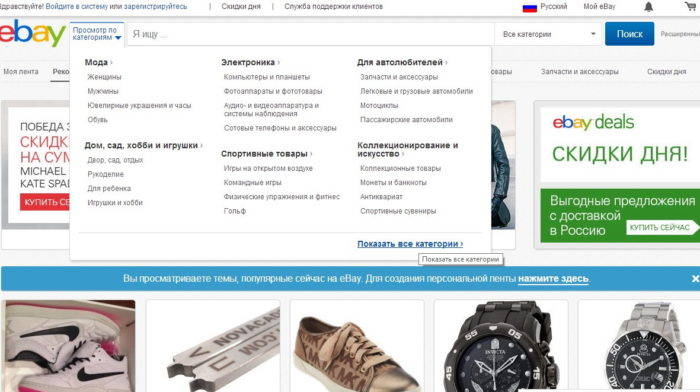
Categories of goods in Russian ebay
How to find goods in the Ebay online store?
How to find the necessary goods by categories, we examined in the previous section. There is another method of searching for interesting clothes, accessories, shoes or gadget according to the search engine of the resource.
You only need to enter for this product Name in the line - I'm looking for. And from a wide variety of offers to choose you like.
To find the product faster, use the filtersthat are available from the left side. Indicate the color of the goods, the brand and other characteristics.

Search for goods on ebay
How to add the goods to the basket on ebay and remove from the basket?
So, you found the necessary thing on the trading platform and decided to make a purchase. How to add the product to the basket, read on:
- Click on the product itself to study the information about it and see the reviews about the seller.
- If you have chosen something from your clothes, then indicate the size and color of the thing.
- Click on the key - Add to Basket. Do not worry - this does not mean that you bought a product.
If you changed your mind to buy a product, then at any time you can delete the product. It is enough to go to your basket, and remove the product with one click by pressing. Button - Delete It is under the description of the goods.
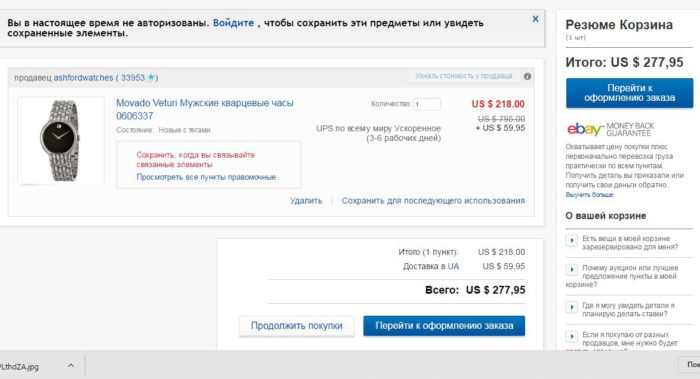
How to transfer the goods to the basket to ebay